Today we are putting a new feature live for Shiberu, using machine learning to pick the correct dictionary meaning for a word.
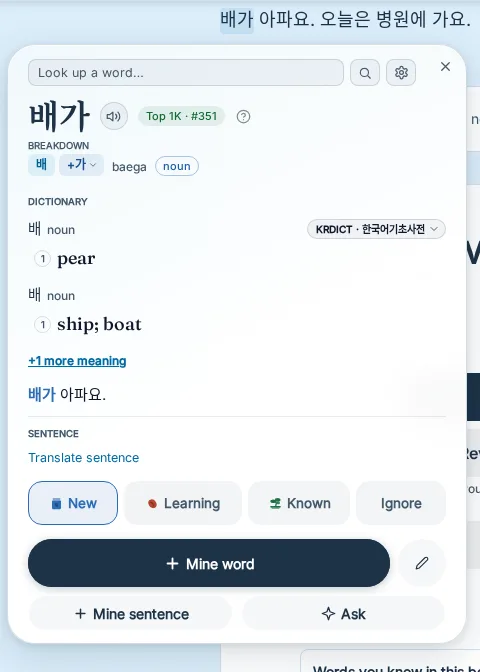
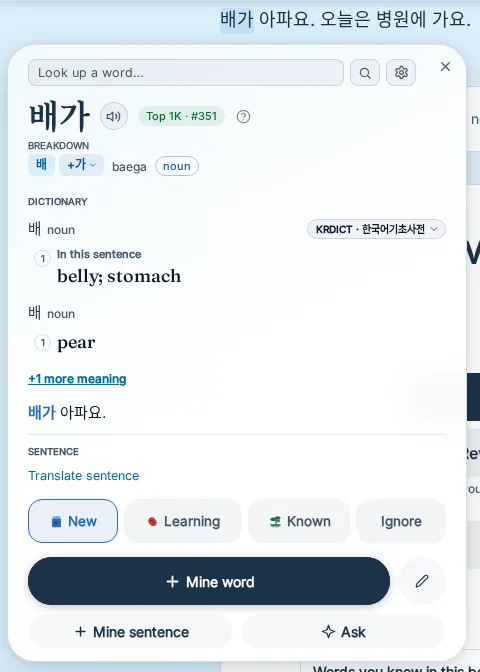
For example, tapping the word "배" in a Korean sentence would show you the word "pear" as the first meaning. However what if the sentence is talking about a stomach ache and not fruits? 배 can have a different meaning depending on the context; pear, boat, stomach, and so on.
It has been almost 9 years since I moved to Seoul, Korea, and I've been learning Korean for longer. I first moved to Korea to do my master's degree in Computer Science & Engineering at Seoul National University, where I specialised in real time systems and artificial intelligence. Naturally I wanted to create a highly performant but also accurate approach for solving this problem and to make it easier for language learners to learn more comfortably. I will now go into detail on how this problem can be solved using machine learning while still remaining highly performant so learners don't have to wait for the system to load when clicking on a word.
Dictionaries list meanings, sentences use one
Dictionaries give you every meaning for a word, in a fixed order. The sentence? It only uses one of them. Some words might have 10-20 meanings. Digging through them all to find the accurate one is annoying and confusing for beginners of a language. This could also cause the wrong definition to come with the word you mine into a flashcard.
To determine how large of a problem this is, we made a test set of 989 sentences that purposely only has words with more than one meaning, in every language the model supports. None of these sentences (or the documents they come from) were used for training the model.
The right meaning in each test sentence was decided by two Claude judges labelling blind (without seeing the model's answer, the dictionary order or each other's answer), and a third judge settled the cases where they disagreed. They agreed with each other on 95-97.5% of sentences, and on Korean sentences taken from KRDICT they matched KRDICT's own meaning on 47 of 50.
For Korean, 48% of the time the first dictionary meaning was the correct one, English 43%, 52% for Chinese and 68% for Japanese.
Three Design Decisions
- Do all the processing before the user even taps a word. When you watch a video with Shiberu, the whole subtitle track is already there from the start. Similarly when you use the Shiberu app's Reader, the current page as well as the surrounding pages are already known. Immediately jobs are dispatched to pre-process the meanings.
- Process all sentences once. We vectorize all sentences into a vector for each word in the sentence. Similarly, every dictionary meaning gets its own vector too, pre-made ahead of time (at the moment, the new model is for Korean, Simplified and Traditional Chinese, Japanese and English, and will later be improved to cover more languages). Picking the correct meaning just becomes vector comparison. In word-sense research, this is called a "bi-encoder" approach, a long sentence with ten words costs one pass, not ten.
- One model for every language. We fine-tuned multilingual-e5, an open-source (MIT) encoder that reads all of these languages. It only outputs vectors, and it runs on CPU fast and efficiently.
Teaching it: about 240,000 labelled sentences
The model learns from examples. The text used for training it was from open text only, such as Tatoeba, KRDICT, Wiktionary and public domain books which we have in the Shiberu Reader library. No commercial material was used, and nothing you watch or read in Shiberu was used either.
For labelling the samples, we used Claude Sonnet 5.5, which had an accuracy of 80.9% on 1,165 of our trickiest Korean and English training sentences (ones where the dictionary itself says which meaning is used), compared to an accuracy of 44.7% when I tried the same sentences with Gemma 4 26B A4B Instruct locally. The dictionary's first meaning was only right 28.2% of the time on these.
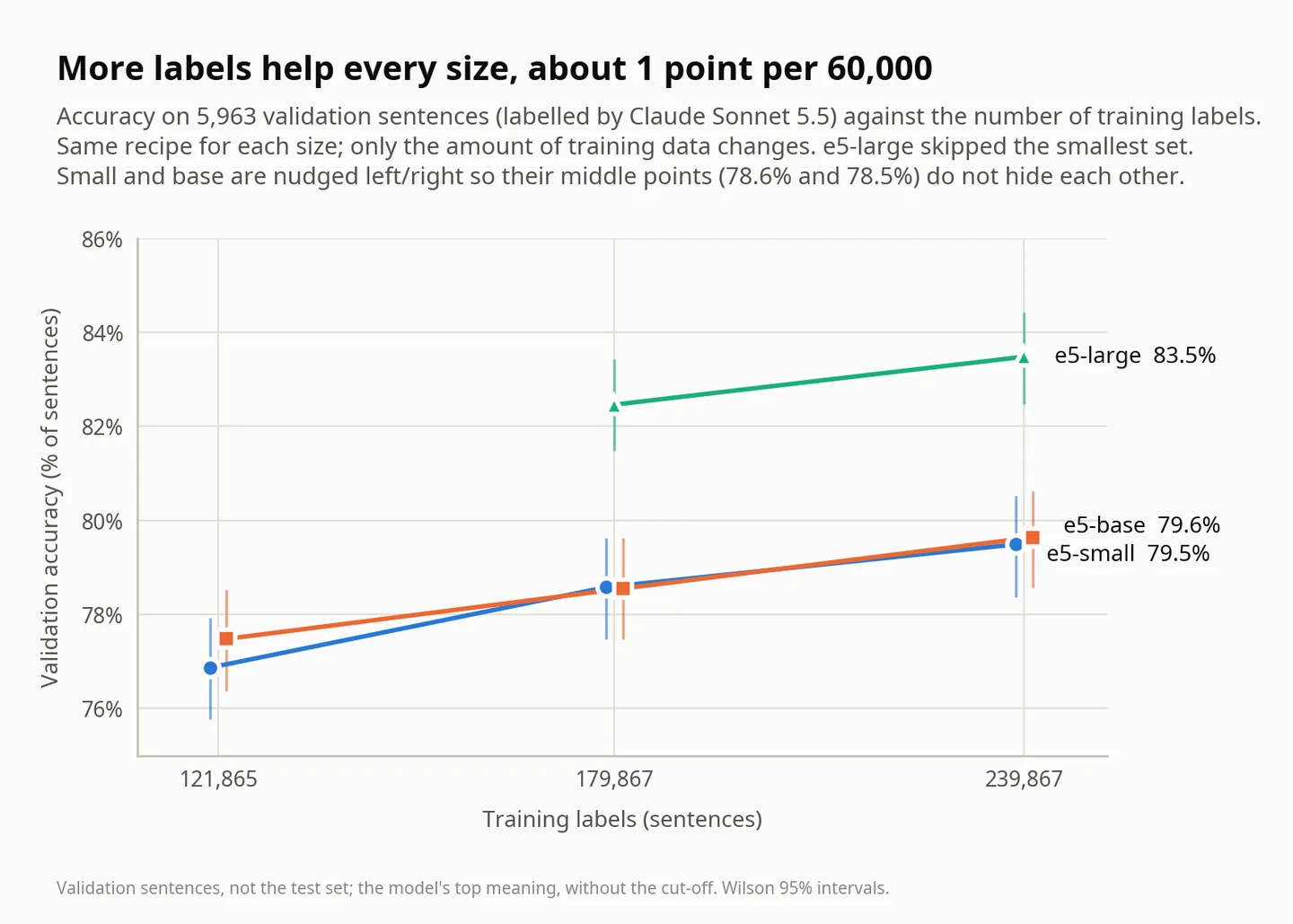
Claude Sonnet 5.5 labelled about 240,000 sentences in three rounds, and more labels kept helping:
The results
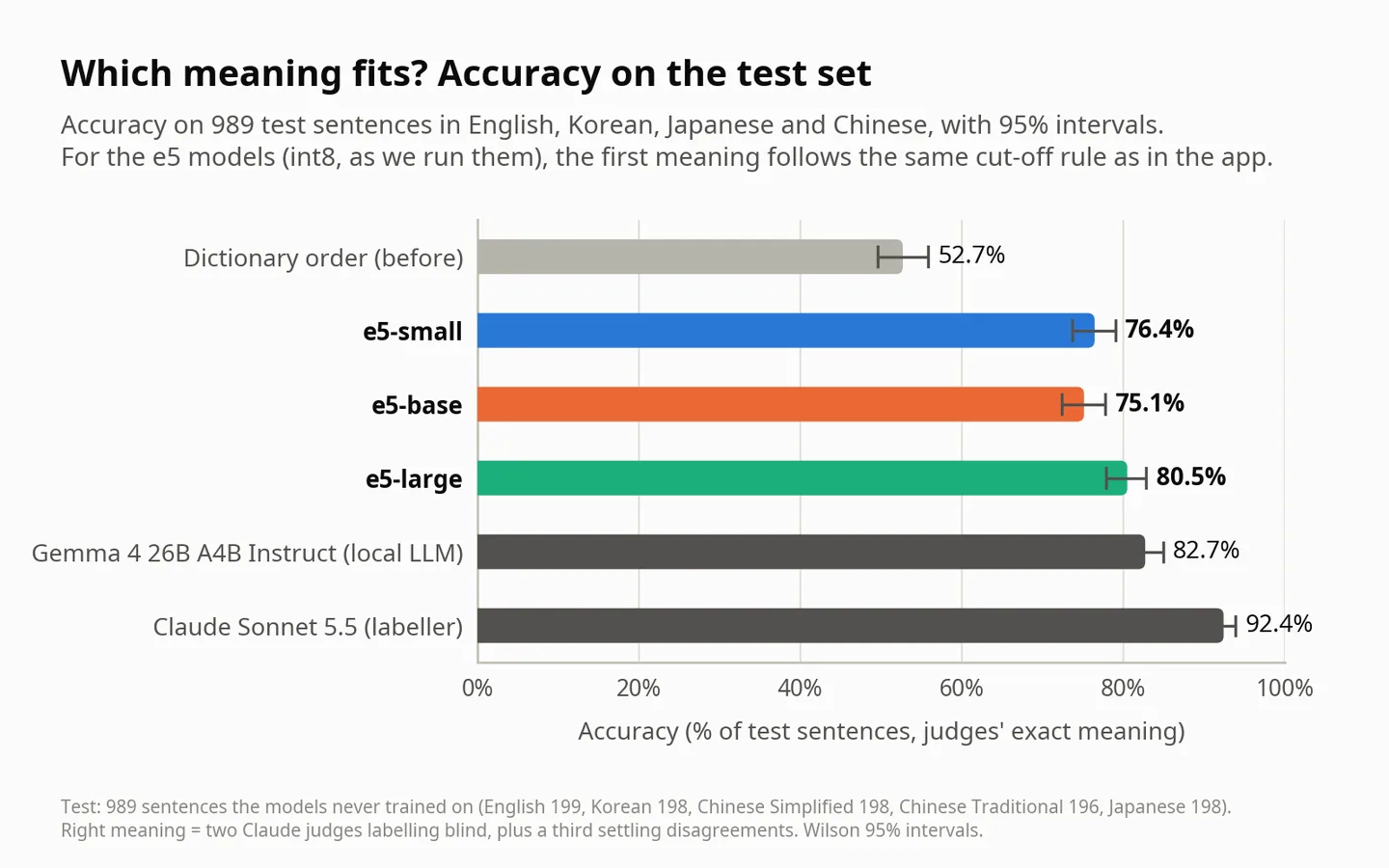
After evaluating the differently sized models, performance and accuracy, we settled on using the finetuned version of e5-large. On the test set it is about two points below Gemma 4 26B A4B Instruct (82.7%), which needs a GPU, while ours runs on a CPU. Claude Sonnet 5.5 scores 92.4% here, so there is still room to grow.
| Language | Dictionary's first meaning | Shiberu's pick |
|---|---|---|
| English | 43.2% | 82.9% |
| Korean | 47.5% | 73.7% |
| Chinese (Simplified) | 52.0% | 81.3% |
| Chinese (Traditional) | 52.5% | 82.1% |
| Japanese | 68.2% | 82.3% |
| All languages | 52.7% | 80.5% |
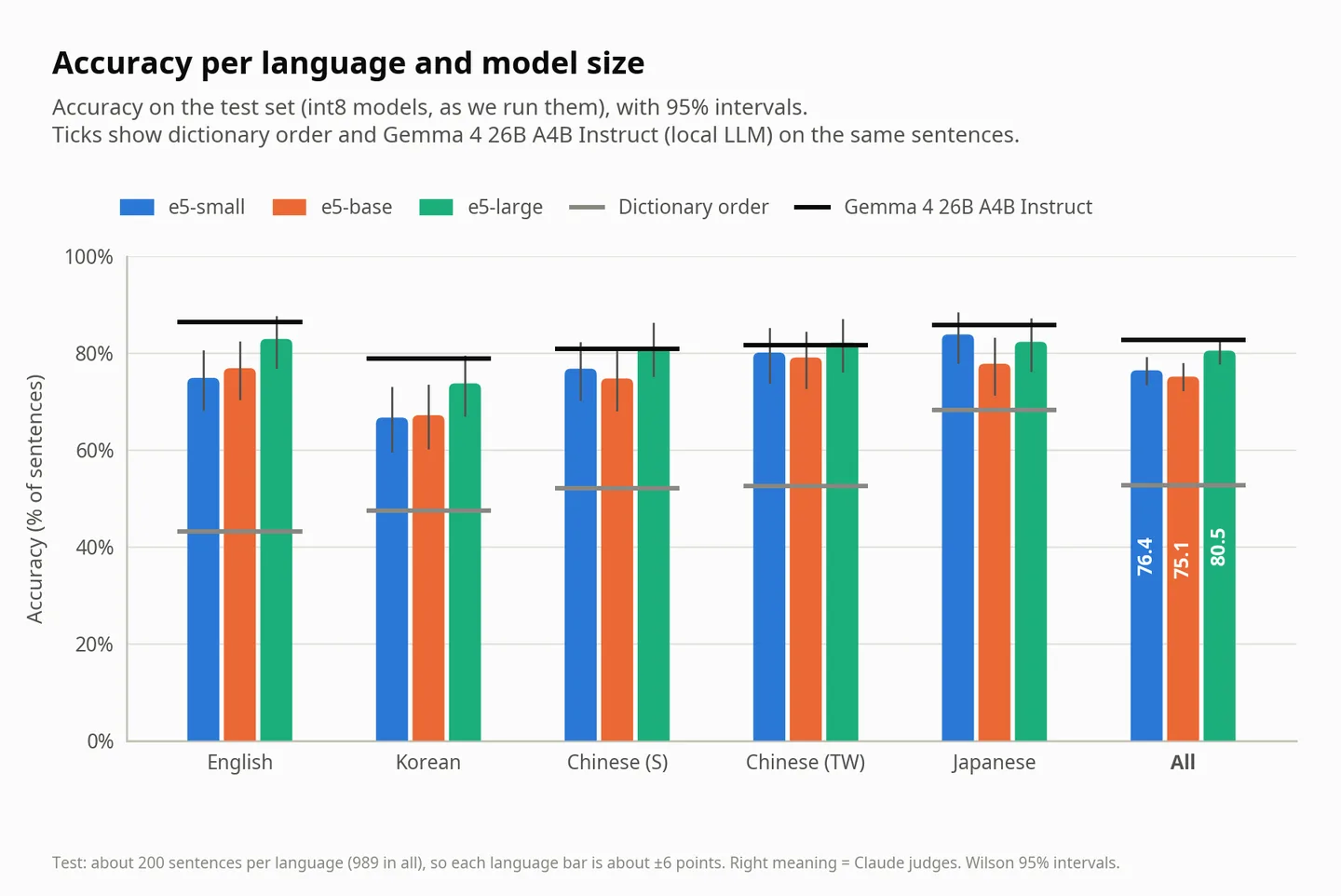
Comparison between the model sizes
| e5-small | e5-base | e5-large | |
|---|---|---|---|
| Parameters | 118 million | 278 million | 560 million |
| Test accuracy | 76.4% | 75.1% | 80.5% |
| Model file (int8) | 181 MB | 533 MB | 1.47 GB |
| Memory | 0.7 GB | 1.2 GB | 2.4 GB |
| A whole 427-line episode, 4 CPU threads | 0.71 s | 2.37 s | 8.23 s |
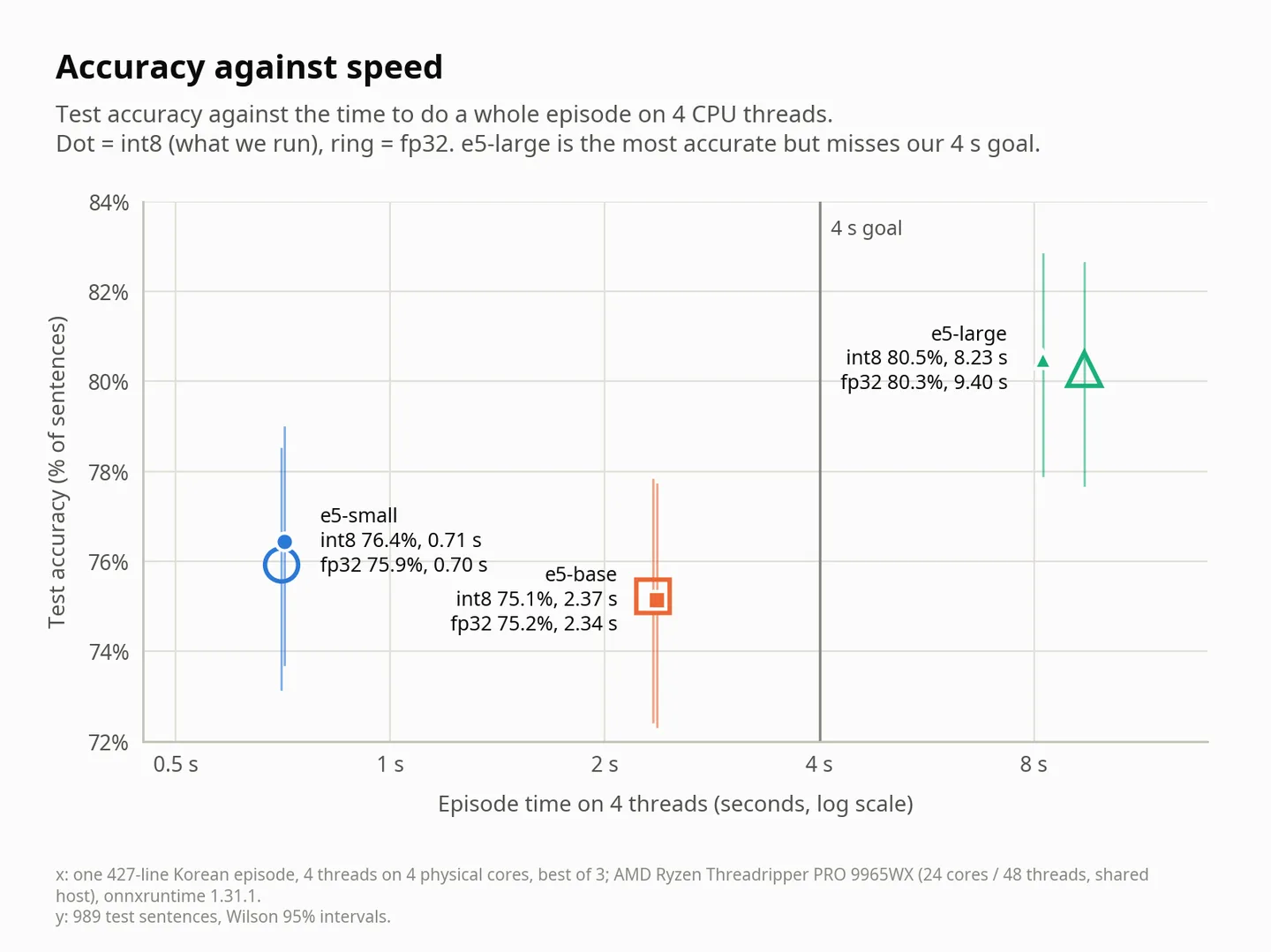
Large is clearly more accurate (80.5% vs 76.4%, p = 0.0005), however 11x slower than small, and misses our goal of 4 seconds for a whole episode. But you never need a whole episode at once: Shiberu processes 20 lines at a time starting from where you are watching, and in the Reader it starts with the page on your screen and then the pages after it.
Two things that made no difference:
- int8 vs full precision. The int8 file is a third smaller and scores 80.5% against 80.3%.
- Threads and batch sizes. Across every thread count and batch size we tried, 0 of 30,288 picks changed.
When to trust the pick
The model outputs a probability for each meaning to show its confidence. We have set a cut-off for each language, chosen so that 90% of the meanings we move to the top are correct (on sentences held back from that tuning it was 88.5%, and 84.9% for Korean), and if no meaning has enough confidence, we show the default dictionary order. With this cut-off rule, the right meaning is shown first 81.1% of the time, up from 53.5% from dictionary order (these percentages are based on validation sentences, and are not comparable with previous percentages mentioned above).
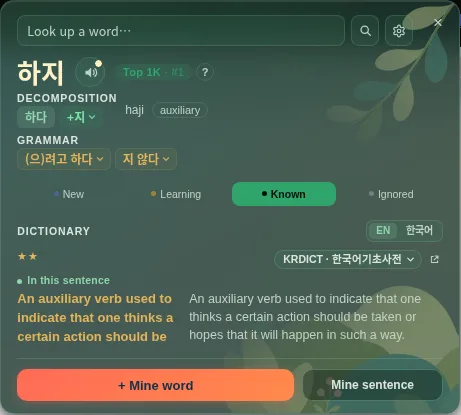
Running it
- Two background workers, 4 CPU threads each, about 2.2 GB RAM per worker.
- In the Reader, the processing is finished for the page on your screen within about 3 seconds of you opening the book, and the pages after it follow.
- If 10 videos are being processed simultaneously on Shiberu (e.g. many users using at same time), the first 20 lines of each video are ready within 2.3 to 3.4 seconds for the median from the video start, and 4.8 seconds at worst.
- The new feature is never blocking or waited for, if processing is not finished, dictionary order is shown.
Future Work
This is the initial implementation, in the future you can expect more language support for the improved meaning picker model, as well as higher accuracy :)
-- Alex, Shiberu Developer, 2026 Nov 15
This is live now as this blog post is published.

